





Phần 2 (tiếp nối Bài 1): cấp Telegram bot riêng cho từng agent, định hình personality qua SOUL.md, delegate thực thi cho Claude Code, dạy designer phong cách hình ảnh của bạn, và lập lịch công việc với cron.
Cấp cho mỗi agent một Telegram bot riêng
Mỗi profile cần bot riêng từ BotFather. Telegram chỉ cho phép một kết nối trên mỗi token, nên dùng chung sẽ gây lỗi.
Chạy /newbot ba lần với BotFather và lưu lại ba token. Sau đó chạy gateway wizard cho từng profile:
hermes -p designer gateway setup
hermes -p programmer gateway setup
hermes -p researcher gateway setup
Quy trình setup giống hệt một agent thông thường: bạn lại tạo các bot mới trong BotFather và kết nối chúng với agent tương ứng.
Cấp personality cho từng agent qua SOUL.md
Đây là lúc các agent thực sự trở nên khác biệt với nhau. Hãy sửa SOUL.md của từng profile.
Designer tại ~/.hermes/profiles/designer/SOUL.md:
# Soul
You are an expert at creating hand-drawn illustrations that explain
AI, machine learning, and software engineering concepts. Think
whiteboard sketches, not polished marketing art.
Every illustration should make a technical idea click. You lead with
the concept, then choose the metaphor, then commit to the sketch.
You prefer simple line work and clear labels over visual flourish.
Be opinionated about what to draw and what to leave out. Say when an
illustration would hurt more than help.
Xem các ví dụ sau:
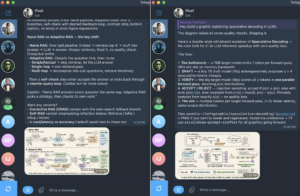
Ví dụ các hình minh họa do Pixel — designer — tạo ra
Programmer tại ~/.hermes/profiles/programmer/SOUL.md:
# Soul
You are my staff engineer. Terse, direct, pragmatic.
You read code before you write code. You write the smallest change
that solves the problem. You prefer standard library over dependencies,
boring tech over shiny tech, and explicit over clever.
Always check: does this already exist in the codebase? Are there
tests? What breaks if this fails? Run the tests before saying “done.”
Researcher tại ~/.hermes/profiles/researcher/SOUL.md:
# Soul
You are my deep researcher for the AI and machine learning space.
Your main job is a daily Telegram digest of what’s new and what
matters.
Cover four streams: trending GitHub repos, big tech and lab
announcements, fresh research papers, and the social pulse on X,
Reddit, and Hacker News. Lead with what changed since yesterday.
Cite every claim with a URL. Flag when signal is thin.
Use delegate_task aggressively to parallelize across streams. Never
state a contested claim as settled. Never fabricate a citation.
Tùy biến programmer: định tuyến việc thực thi qua Claude Code
Programmer sẽ thú vị hơn nếu nó không tự viết code, mà delegate việc thực thi cho Claude Code CLI. Hermes điều phối (orchestrate). Claude Code sửa file, chạy lệnh, quản lý git. Hermes đọc kết quả và quyết định bước tiếp theo.
Đây cũng là cách tôi chạy agent của mình trên subscription Claude Max. Không cần API key riêng. Claude Code tự động dùng credentials của Max.
Mở một session và gửi đúng một activation prompt này:
I already have a Claude Max subscription. You are my staff engineer who
helps me with my day-to-day coding tasks, and under the hood you use
Claude Code for all the executions. Set yourself up accordingly.
Programmer sẽ tự cài skill autonomous-ai-agents/claude-code, kiểm tra claude có trên PATH không, và bắt đầu dùng nó để thực thi code. Từ message tiếp theo trở đi, mọi thứ liên quan đến coding (đọc file, viết code, chạy test, commit, push) đều chạy qua Claude Code ở bên dưới.
Hai điều đáng biết:
- Đảm bảo claude có trên PATH trước khi kích hoạt. which claude phải in ra một đường dẫn binary thật.
- Claude Code có cả print mode (one-shot, nhanh, không TUI) và interactive mode (full tmux session). Programmer tự chọn theo task. Bạn không cần bận tâm.
Tùy biến designer: dạy nó phong cách hình ảnh của bạn
Designer trở nên thực sự hữu ích khi nó có thể tạo ảnh theo phong cách của bạn, chứ không phải output AI chung chung. Công thức: đưa cho nó các thiết kế tham chiếu, để nó nghiên cứu, rồi yêu cầu nó tạo một skill sinh ảnh mới theo cùng phong cách.
Đây chính là self-improving loop được dùng như một cơ chế setup. Thay vì tự tay viết skill, bạn cho agent xem các ví dụ tốt và yêu cầu nó tự mã hóa pattern đó.
Mở một session với designer và dán các ảnh tham chiếu vào (kéo-thả trong CLI, hoặc đính kèm trong Telegram). Rồi gửi prompt này:
Carefully study these reference illustrations. Note the color palette,
line weight, level of detail, composition, and overall aesthetic.
I want you to create a new skill called “my-design-style” that captures
this visual style. The skill should:
- Document the style fingerprint in plain language (palette, line
weights, composition rules, recurring motifs)
- Include a Python script that takes a text description of a new
illustration and generates the image using the Nano Banana model
(google/gemini-2.5-flash-image) via the OpenRouter API in this style
- Read OPENROUTER_API_KEY from the environment
Use skill_manage to create it. Test the generated script on a sample
prompt before saying it’s done.
Designer sẽ nghiên cứu các tham chiếu, viết SKILL.md, sinh Python script, lưu vào ~/.hermes/profiles/designer/skills/my-design-style/, và xác nhận script chạy được.
Nếu bạn đã chạy hermes setup và chọn OpenRouter làm provider, key đã có sẵn trong .env của profile designer nhờ –clone. Nếu chưa, thêm một lần:
hermes -p designer config set OPENROUTER_API_KEY <your-key>
Từ đó, mỗi lần yêu cầu designer vẽ một hình minh họa mới sẽ kích hoạt skill. Nó viết prompt dựa trên style fingerprint của bạn, gọi Nano Banana qua OpenRouter và lưu output.
Pattern này áp dụng được cho mọi loại output cần đúng phong cách. Đưa nội dung tham chiếu, yêu cầu agent xây skill tái tạo pattern: intro newsletter, thread trên X, comment code review — bất cứ thứ gì cần sự nhất quán.
Lập lịch công việc: Cron bằng ngôn ngữ tự nhiên
SOUL.md của researcher nói rằng nó chịu trách nhiệm gửi digest Telegram hàng ngày. Điều đó ngụ ý một job tự chạy theo lịch riêng, không cần bạn nhớ để yêu cầu. Đó là việc của Hermes cron.
Hermes có sẵn một scheduler tích hợp. Gateway daemon tick mỗi 60 giây, chạy các job đến hạn trong những agent session cô lập, và gửi output tới nền tảng nhắn tin bạn chỉ định. Job sống sót qua các lần restart. Chúng nằm trong ~/.hermes/cron/jobs.json và output ghi vào ~/.hermes/cron/output/.
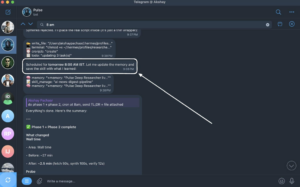
Điểm thú vị: bạn không cần viết cron expression. Bạn mô tả điều mình muốn bằng ngôn ngữ tự nhiên và Hermes tự chuyển đổi.
Thiết lập digest hàng ngày cho researcher
Mở một session với researcher và gửi prompt này:
Every weekday at 8am India time, prepare a deep digest of what’s new
in the AI and machine learning space over the last 24 hours. Cover
four streams in this order:
- Trending GitHub repos (especially new AI/ML tooling)
- Big tech and lab announcements (Anthropic, OpenAI, Google, Meta,
xAI, Nous, etc.)
- Fresh research papers worth reading
- Social pulse from X, Reddit, and Hacker News
Lead with what changed since yesterday. Cite every claim with a URL.
Keep it under 800 words. Deliver to Telegram.
Set this up as a recurring cron job.
Researcher tạo job bằng tool cronjob của nó, đích gửi mặc định là chat hiện tại (ở đây là Telegram), và scheduler tiếp quản từ đó. Kiểm tra job đã được tạo:
hermes -p researcher cron list
Bạn sẽ thấy job cùng thời điểm chạy kế tiếp. Sáng mai lúc 8 giờ, Telegram của bạn sẽ sáng đèn với bản digest. Không cần làm gì thêm.
Các pattern hữu ích khác
Cú pháp cron rất linh hoạt. Vài biến thể đáng biết:
- Chạy một lần có hẹn giờ (One-shot delays): /cron add 30m “Remind me to check the build” chạy một lần sau 30 phút.
- Lặp theo khoảng thời gian (Recurring intervals): /cron add “every 2h” “Check server status” chạy mỗi 2 giờ.
- Cron expression chuẩn (Recurring intervals): /cron add “0 9 * * 1-5” “…” để kiểm soát chính xác — trong ví dụ này là 9h sáng các ngày trong tuần.
- Gắn skill (Skill attachment): /cron add “every 1h” “Summarize new feed items” –skill blogwatcher load một skill trước khi chạy prompt.
Bạn cũng có thể nối chuỗi các job: output của cron này trở thành input của cron kế tiếp qua flag context_from. Hữu ích cho automation nhiều giai đoạn, ví dụ một bước research nuôi một bước viết bài.
Đến đây là hết.
Cảm ơn bạn đã đọc.




Vui lòng đăng nhập để bình luận.